
Lingvano: Sign Language - ASL
LingvanoEducation
4.87.01K Reviews
- Version
- 6.0.3
- Installs
- 1.00M
- Age Rating
- Everyone
Screenshots
Our Review of Lingvano: Sign Language - ASL
 Analysis by Appyee
Connection is easy to overlook when a lesson fits into a coffee break, but it can shape how smoothly a sign-language session goes. With Lingvano: Sign Language - ASL, I’d treat a steady connection as part of the learning setup, especially for lessons that rely on watching people sign. That matters more here than it might in a text-heavy language app: hand shape, movement, facial expression, and timing all contribute to what I’m trying to understand.
When a connection matters most
Video-based instruction is central to the experience, so I would plan to study where I can load and watch lessons comfortably. A short session at home, on a reliable network, makes it easier to focus on the signer instead of wondering whether a clip is still loading. When I’m out, I’d start a lesson before settling into a busy commute or a place where reception is unreliable, rather than counting on every activity to work smoothly in every network condition.
This is also a useful way to decide when to practise. If I have only a few minutes and a good connection, I can spend that time following a lesson and watching the signs carefully. If the network is slow, I’m better off reviewing what I already remember mentally or saving a new lesson for later. That small adjustment helps keep a hiccup from turning into a frustrating study session.
Choosing the right mobile moment
The short-lesson format suits everyday gaps, but the best setting depends on what I’m practising. A quiet break at a desk is better for watching details than trying to follow a clip while walking or splitting attention between the screen and other tasks. Since ASL is visual, I need to be able to look closely at the signer; treating lessons like background audio would miss the point.
A realistic routine might be to practise one lesson during a lunch break, then revisit a tricky sign later when I have enough time to watch it attentively. I’d also keep the phone positioned so the video is easy to see, rather than holding it at an awkward angle. These aren’t complicated requirements, but they make a real difference when I’m trying to notice how a movement changes from one sign to another.
Recovering when a session stalls
If a video pauses or a lesson does not load as expected, I would first check whether the connection is stable and then try again when it is. I would avoid tapping through quickly while distracted, because the point is to observe and practise accurately, not merely to mark a lesson as done. When I return, repeating the last section I understood is more useful than guessing at what I missed.
That approach also sets a sensible expectation: a mobile learning app can make practice convenient, but it cannot remove every interruption caused by a weak network or an unsuitable setting. I’d choose a calmer moment for new material and use short sessions when I can give the screen my full attention. In my experience, that is a better recovery strategy than trying to force a lesson into a moment that clearly isn’t working.
Keeping mobile study practical
For data-conscious use, I’d favour a trusted Wi-Fi connection for video lessons when one is available, particularly if I plan to study for longer than a quick check-in. I would also avoid assuming that previously viewed material will be available without a connection; I’d prepare my study time around access to the app rather than building a routine that depends on offline playback. That keeps expectations realistic and avoids discovering a connection problem halfway through a planned session.
It is also worth matching the session to the situation. A brief review on mobile data may be reasonable when I have a clear signal and want to use a spare moment, while a longer stretch of video practice is easier to plan around Wi-Fi. The trade-off is simple: convenience is valuable, but watching and repeating visual lessons works best when playback is dependable and I’m not rushing.
Getting Started with Lingvano
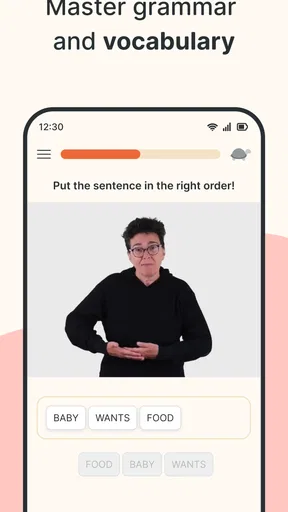
When I first downloaded Lingvano, I was a bit skeptical. Could an app really teach me a whole language? But right off the bat, the interface was super user-friendly. The app starts you off with basic lessons, guiding you through the essentials of ASL. Whether you’re a complete newbie or have some basic knowledge, the app scales its lessons to suit your pace.
Lingvano is an education app from developer Lingvano, and its focus on American Sign Language gives the lessons a clear purpose rather than trying to cover every signed language at once. The free app has a 4.8 average from around 68,000 ratings, with more than a million installs; I see that as encouraging context, not proof that any one learner will progress quickly. It is rated for Everyone, while optional in-app purchases range from $17.99 to $134.99 per item. I’d start by checking what the free experience lets me do before deciding whether a paid option fits my goals.
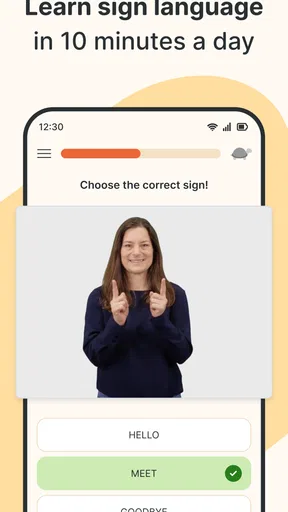
One of the things I absolutely loved is the bite-sized lessons. They are perfect for squeezing in some learning during a coffee break or while commuting. Each lesson is interactive, combining videos, quizzes, and practice sessions. It’s like having your own personal sign language tutor right in your pocket.
The Learning Experience
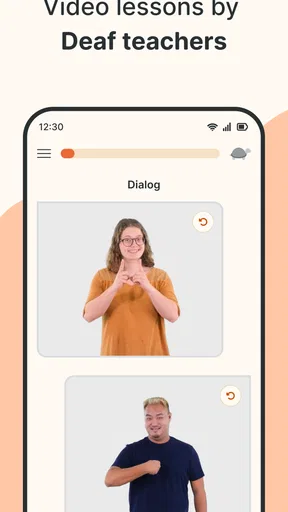
The learning modules are structured in a way that feels more like playing a game than studying. I found myself eager to unlock new lessons and earn rewards. The app uses a mix of videos featuring real people signing, which is crucial for understanding the nuances of gestures and facial expressions in ASL.
To get more from those videos, I wouldn’t treat a correct quiz response as a sign mastered for good. I’d pause to compare similar-looking movements, watch the demonstration again, and practise reproducing it at a comfortable pace. One useful trade-off with any guided lesson app is that recognition exercises can make progress feel quick, while expressive recall—producing the sign without a prompt—takes more deliberate repetition. I’d use the quizzes to spot what needs work, then spend a moment signing the answer myself before moving on.
Another feature that stood out to me is the conversation practice. This is where you can watch a sign language conversation and then participate by signing your responses. It’s an excellent way to build confidence and ensure you’re not just memorizing signs but actually learning to communicate.
Practice beyond the lesson screen
Conversation exercises are most helpful when I use them as a bridge to real interaction, not as a substitute for it. For example, I might practise a greeting and a simple exchange before meeting someone who signs, then pay attention to how a real conversation moves rather than expecting the app’s practice to cover every situation. Signing with another person involves turn-taking, context, and making sure both people understand one another; a guided activity can help me prepare, but it cannot reproduce every social nuance.
That distinction is important for beginners who want to communicate with Deaf people. I’d approach the lessons with curiosity and respect, and remember that learning vocabulary is only one part of communication. Facial expression and the way a sign is used in context matter too. The app’s visual demonstrations make those elements easier to notice than a plain vocabulary list would, but actual practice with people remains valuable when it is available and welcome.
Who will get the most from it
I’d recommend this as a starting point for someone who wants a structured introduction to ASL and is comfortable learning through videos and short exercises. It can suit a student exploring sign language, a family member preparing to communicate more thoughtfully with a signing relative, or a curious learner who wants a regular practice habit. The ten-minutes-a-day idea is a manageable target, but consistency matters more than treating that time as a promise of fluency.
I’d be more cautious if someone needs ASL for an immediate, high-stakes conversation, such as interpreting essential information at work or in a medical setting. A beginner app cannot replace qualified instruction or an interpreter when accuracy is critical. It may also be the wrong fit for someone seeking a different signed language: sign languages are not universal, and an ASL-focused course is not a substitute for learning the language used by the community they hope to communicate with.
For a learner choosing between this and a dictionary-style reference, the difference is practical. A dictionary can be handy when I need to look up one sign quickly, but it may not guide me through a learning sequence or give the same sense of practice. A classroom or live tutor offers more direct feedback and can respond to a learner’s questions, though it requires arranging time with another person. I see Lingvano as the convenient middle ground: more guided than a list of signs, less personal than instruction with a teacher.
Making a routine that sticks
One helpful workflow is to keep new material and review separate. I’d use a short session to learn something new when I can watch attentively, then revisit signs I found difficult in a later session instead of cramming everything into one sitting. If a lesson feels easy because the answer choices are familiar, I’d test myself by looking away from the prompt and trying to produce the sign from memory. That is a simple check on whether I can recall it rather than merely recognize it.
I’d also set a realistic goal based on why I’m learning. Someone preparing for a family gathering might focus on useful introductions and everyday exchanges, while a learner studying out of interest may prefer a slower, broader routine. In either case, I would not measure progress only by how many lessons I complete. Being able to understand and use a few signs confidently is more valuable than rushing through material I cannot recall later.
What to expect from the product
The app was released on January 11, 2021, and version 5.0.9 requires Android 8.0 or later. Those details are useful if I’m checking whether an older Android phone can run it. On iOS, I’d check the requirements shown for my device before installing, rather than assuming the Android minimum applies there too. The lesson approach itself is particularly suited to a phone because the demonstrations are visual, though a larger screen can make it easier to inspect hand movement and facial cues.
Cost is another practical question. I can begin with the free app, but in-app purchases are available, so I would review the options presented in the app and decide whether they make sense for the amount and kind of learning I want. The listed purchase range is broad, and I would not assume that every learner needs to buy anything. A few focused sessions are a sensible way to judge whether the teaching style suits me before committing to a paid plan or purchase.
Why Lingvano is a Game-Changer
One of the highlights of Lingvano: Sign Language - ASL is its community aspect. Within the app, you can connect with other learners, share tips, and even practice signing with each other. This feature makes learning interactive and helps you stay motivated.
For me, the value of a learner community is less about collecting contacts and more about having a reason to return to practice. It can be encouraging to compare notes with people who are also working through the basics, but I would still treat peer practice as informal. If a sign or usage question matters, I’d look for reliable instruction rather than assuming that another beginner’s answer is definitive. That balance lets the community support motivation without making it the sole source of guidance.
The app is also continually updated with new content, which keeps the learning fresh and engaging. Plus, it’s designed by a team that includes members of the deaf community, ensuring that the content is both accurate and respectful.
My verdict on learning with a connection
For connectivity, my practical verdict is straightforward: plan video-heavy study for a time and place where the app can load reliably, and keep a short mobile session for moments when you can give the screen your attention. I would not build a study plan around assumed offline access. A connection issue is inconvenient, but it does not make the learning approach unsuitable; it simply makes timing and preparation more important.
Final Thoughts
All in all, if you’re interested in learning ASL, Lingvano is a fantastic tool. It’s comprehensive, engaging, and truly effective. Whether you want to learn ASL for personal reasons, professional development, or simply to expand your communication skills, this app is a great place to start.
So why not give it a try? With its intuitive design and supportive community, you might find yourself not just learning a new language, but also gaining a deeper appreciation for the art of communication itself.
Privacy and Permissions
See what permissions an app requests and how it handles your data.
- Photos/Media/Files
- read the contents of your USB storage, modify or delete the contents of your USB storage
- Storage
- read the contents of your USB storage, modify or delete the contents of your USB storage
- Camera
- take pictures and videos
- Wi-Fi connection information
- view Wi-Fi connections
- Other
- view network connections, full network access, run at startup, draw over other apps, control vibration, prevent device from sleeping
Verdict
Strengths of Lingvano: Sign Language - ASL
- User-friendly interface for beginners.
- Interactive lessons enhance learning.
- Offline mode available for practice.
- Comprehensive ASL vocabulary coverage.
- Regular updates with new content.
Limitations of Lingvano: Sign Language - ASL
- Limited free content; subscription needed.
- Some lessons may feel repetitive.
- In-app purchases can be pricey.
- Requires stable internet for updates.
- No voiceover feature for hard of hearing.
Similar Picks in This Category
View All
Duolingo: Language Lessons
Duolingo4.7

Google Classroom
Google LLC2.8

Unacademy: Learn & Crack Exams
Unacademy3.2

Bible App for Kids
Life.Church4.4

Cake - Learn English & Korean
Cake Corp.4.7

Brainly: AI Homework Helper
Brainly4.5
Frequently Asked Questions
What is Lingvano: Sign Language - ASL, and who is it for?
Lingvano: Sign Language - ASL is an educational app designed to teach users American Sign Language (ASL) through interactive lessons and real-life dialogues. It is ideal for beginners looking to learn ASL for personal or professional reasons, as well as those who want to communicate more effectively with the Deaf community.
How does the learning process work in Lingvano?
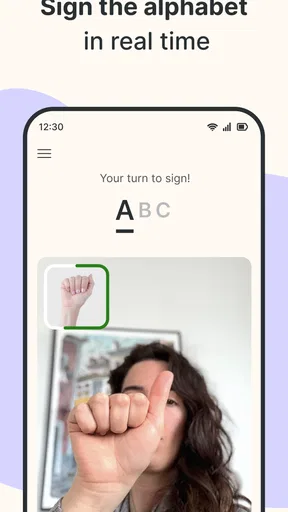
Lingvano uses a combination of video tutorials, interactive exercises, and quizzes to teach ASL. Users can watch native signers demonstrate signs and practice them using the app's mirror function. The lessons are structured to gradually increase in complexity, making it easy for learners to build their skills over time.
Is Lingvano suitable for complete beginners in ASL?
Yes, Lingvano is designed to be accessible for complete beginners. The app starts with the basics of ASL and gradually moves to more advanced topics. It provides a supportive learning environment, with features like progress tracking and reminders to help users stay motivated and on track with their learning journey.
Does Lingvano require an internet connection to use?
Lingvano primarily requires an internet connection to access its features and content. However, certain lessons or materials may be available offline once downloaded. It’s advisable to check the app’s settings or FAQ section for specific offline capabilities to ensure learning can continue without a constant internet connection.
Are there any subscription costs associated with Lingvano?
Lingvano offers both free and subscription-based plans. The free version includes basic lessons and features, while the premium subscription provides access to more advanced content and additional learning tools. Users can choose the plan that best fits their learning needs and budget, with options for monthly or annual subscriptions.
